Group texts help people stay connected. But some chats become annoying quickly. You might join a work group once. Then the messages keep coming for months. (Remove Myself From Group).
The good part is simple. Your phone often gives you options. On iPhone, leaving works with certain iMessage groups. The group needs enough people too. Everyone also needs an Apple device. Android works differently with group texts. RCS groups may offer a leave option. Standard SMS and MMS groups often do not. This guide explains each option in simple steps.
What To Check Before Leaving A Group Text
Your phone type matters before you change anything. The message type matters too. Check these details before searching for a leave button.
- Phone Type: Check if you use iPhone or Android.
- Chat Type: Look for iMessage, RCS, SMS, or MMS.
- Group Size: iPhone groups need enough members.
- App Used: Check Messages or another chat app.
- Leave Button: Open group details and check first.
How to Leave A Group Text on iPhone
iPhone users sometimes get a clear leave option. The option depends on the group setup. Apple requires certain conditions before showing it.
Open The Group Message
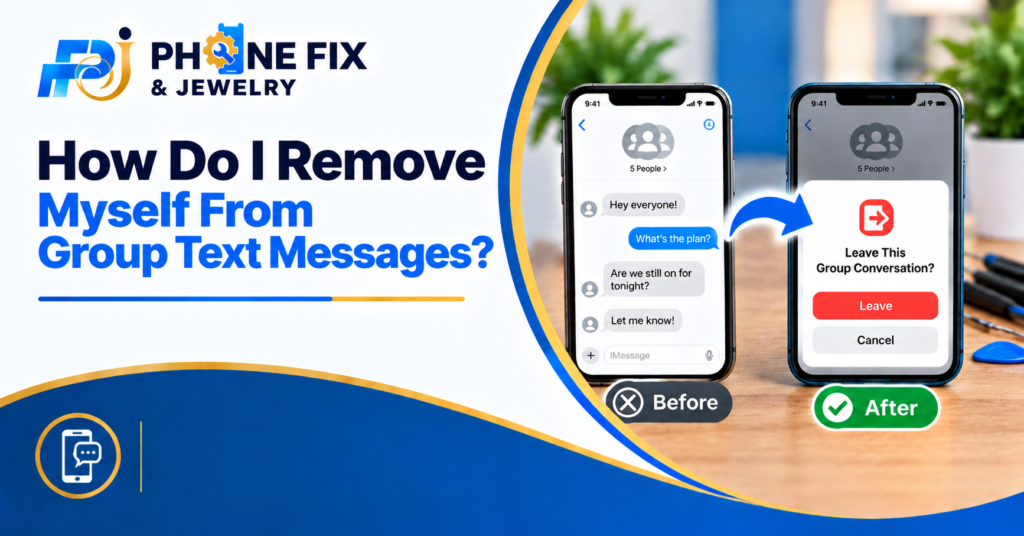
Open the Messages app on your iPhone. Find the group conversation you want to leave. Tap the conversation to open it.
Next, tap the group icons at the top. This opens the group details screen. Scroll down through the available options.
Tap Leave This Conversation
Look for “Leave this Conversation” near the bottom. Tap it when you see it. Your phone then asks you to confirm.
Tap “Leave Conversation” again. You should then leave the group. New messages from the group should stop arriving.
Check If The Option Is Missing
No leave button does not mean your phone broke. The group may include a non-Apple device. The group may also lack enough members.
Apple requires three other people in qualifying groups. Everyone must use Apple devices with iMessage. If those conditions fail, use Hide Alerts instead.
How To Leave A Group Text On Android
Android phones use several messaging systems. Google Messages also supports RCS group chats. Standard SMS groups work differently.
- RCS Chat: Some RCS groups offer a leave option.
- SMS Groups: Standard SMS groups often lack exit controls.
- MMS Groups: MMS groups may also lack a leave option.
- Google Messages: Check group details for available controls.
- Mute Option: Silence alerts when leaving fails.
What If You Cannot Leave the Group?
Many people search for how to remove themselves from group text messages after finding no button. The problem often comes from the message type.
Try Muting The Conversation
Muting stops alerts from disturbing you. The group still stays in your messages. You also remain part of the conversation.
On iPhone, use Hide Alerts. Open the group and tap its icon. Then turn on Hide Alerts.
Android phones use different menu names. Look for Mute, Notifications,s or Silent. The exact wording depends on your phone app.
Delete The Conversation
Deleting removes the thread from your message list. It does not always remove you from the group. New messages may create the thread again.
This option works better for old chats. It keeps your inbox cleaner. Use mute when messages keep arriving.
Block Or Report Spam
Spam groups need stronger action sometimes. Google Messages offers spam controls for unwanted messages. Check the group details menu first.
Blocking depends on your phone and message type. It may stop unwanted messages from reaching you. Use this choice for suspicious or unwanted texts.
Why Does The Leave Button Stay Missing?
The missing button usually has a clear reason. Your group type often controls what you see. Check the points below before changing phone settings.
- Mixed Devices: Apple groups lose some leave controls.
- SMS Group: Standard texts often lack a leave feature.
- Small Group: Some iPhone groups need more members.
- App Limits: Your messaging app may use different controls.
- RCS Settings: Android group options depend on RCS support.
Can Android Users Leave Group Texts?
Android users need to check the chat type first. Google Messages supports group controls through RCS. Standard SMS groups work in another way.
Check For RCS
Open Google Messages and select your group chat. Open the group details screen. Look for a Leave option.
RCS supports more group controls than standard texting. Google says RCS supports removing yourself from groups. Your group still needs RCS support.
Check For SMS Or MMS
Standard SMS and MMS groups often lack a leave button. These groups use traditional carrier messaging. Your phone usually cannot remove your number.
You may still mute the conversation. You may also delete the thread. Spam controls may help with unwanted groups.
Try Another Messaging App
Some people use WhatsApp or Messenger instead. Those apps have their own group controls. Open group information and check for Leave Group.
Do not confuse app chats with normal texts. Each service handles group membership differently. Always check the app name first.
What Happens After You Leave A Group?
Leaving a group stops your participation in supported chats. You should stop receiving new messages there. Your old conversation may still stay on your phone.
Deleting the old thread works separately. It only removes your copy from the inbox. It does not always remove your number.
Muting also works differently. You stay inside the group after muting. You simply stop getting alerts from it. Knowing these differences saves time. It also stops you from changing random phone settings.
Two Quick Tips for Group Text Problems
- Check your chat type before changing settings.
- Use mute when your group lacks a leave option.
Tip: Check Your Phone First
Your phone model does not tell everything. The messaging system also matters. Check iMessage, RCS, S,MS or MMS first.
Tip: Do Not Delete Too Quickly
Deleting a chat does not always remove membership. New messages may bring the thread back. Muting works better for active groups.
Tip: Save Important Messages
Check the conversation before leaving it. Save names, photos,tos or details you still need. Then leave or mute the group.
A Simple Way To Handle Group Texts
Start by opening your group conversation. Check the group details screen for options. iPhone users should look for Leave this Conversation.
Android users should check for RCS features. Standard SMS groups may lack a leave option. In those cases, mute the group instead.
You do not need random settings changes. Check the chat type first. Then choose the option your phone supports.
How Phone Fix & Jewelry Can Help
Phone Fix & Jewelry helps with phone problems in Alexandria. The shop also handles tablets, laptops, and game consoles. Their team works on many common device problems.
You may need help if Messages behave oddly. A damaged screen may make phone settings hard to use. Charging problems may also stop you from using your phone.
At our shop, we offer smartphone repair and tablet repair. They also handle laptop and game console repairs. Most repairs happen the same day at Van Dorn.
The shop provides free diagnostic checks. Repairs include a written warranty on parts and labor. Staff also test important phone functions before payment.
You can visit 504C S Van Dorn St. The shop sits near Van Dorn Metro. Free parking is available outside the store.
Call Phone Fix & Jewelry at (703) 328- 0514. You may also visit the shop during open hours.
Conclusion
Group texts do not work the same way everywhere. iPhone users have clear rules for leaving groups. Android users need to check RCS or SMS first. Missing leave buttons often have a simple reason. Try mute controls when leaving fails. If your phone has other problems, Phone Fix & Jewelry offers local repair help. Call (703) 328 0514 for support.
Frequently Asked Questions:
How do I remove myself from group text messages?
Open the group details screen first. iPhone users may see Leave this Conversation. Android users should check for an RCS leave option.
How do I leave a group text on iPhone?
Open Messages and select the group. Tap the group icons at the top. Scroll down and select Leave this Conversation.
Why can’t I leave a group text?
Your group may use SMS or MMS. iPhone groups also need enough Apple users. Check the group type before trying other settings.
How do I stop group text notifications?
Open the group conversation settings. Choose Hide Alerts, Mute, or Silent notifications. Your phone will stop sending alerts from the group.
Can I leave an Android group text?
RCS groups may offer a leave option. Standard SMS or MMS groups often do not. Mute or block controls may work instead.