Have you ever opened your mobile screen to fifty missed text alerts in two minutes? Learning How To Exit A Group Chat On iPhone stops these loud alerts fast. Many users struggle because the red exit option disappears suddenly. Other times, non-Apple phones block standard leave steps entirely.
Loud notification sounds drain your phone battery and ruin your concentration during work hours. This quick guide shows you simple ways to drop noisy text groups on any Apple model. You will learn to fix broken chat threads, silence spam texts, and get your daily peace back today.
Simple steps: How To Exit A Group Chat On iPhone?
Getting out of an active group message takes only a few taps. You just need to open your chat settings to begin.
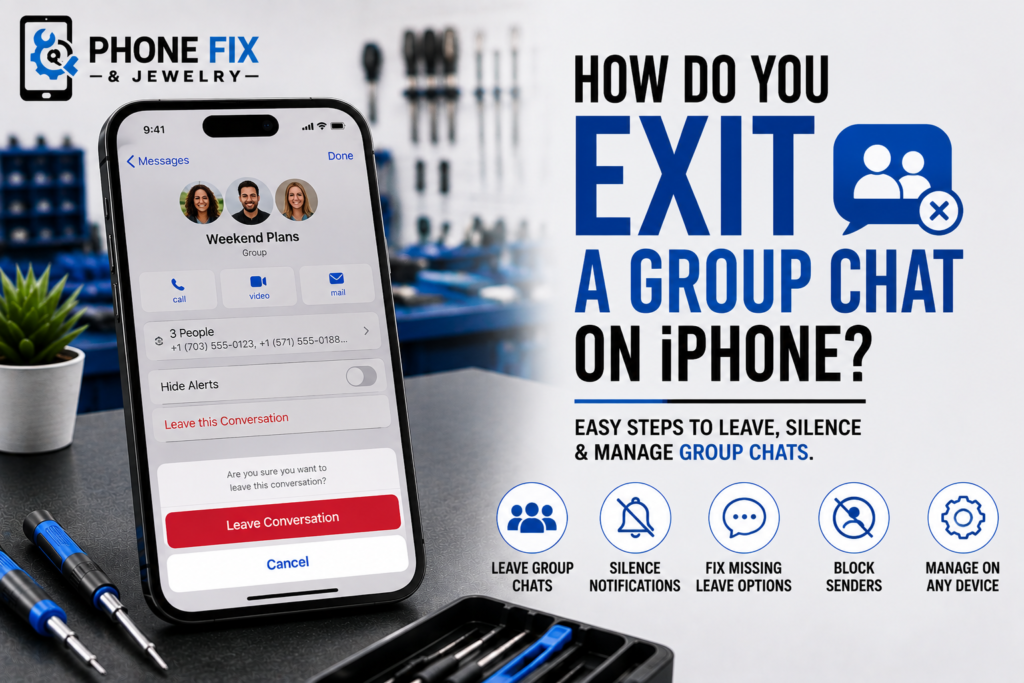
- Open your chat: Tap the text thread you want to drop inside your app.
- Tap the icons: Select the top profile picture area at the screen center.
- Scroll down fast: Move to the bottom part of the detail menu screen.
- Tap Leave thread: Choose the red button labeled Leave this conversation.
- Confirm your exit: Click the pop-up option to exit the group chat.
Why the leave option is missing
Sometimes your phone hides the red exit button from your view. Here are three reasons why this problem happens to users.
Small group sizes
Apple needs four people in a group to let you exit. If only three people exist, nobody can leave. Adding another user brings back your missing leave button instantly.
Mixed phone types
You cannot leave texts with non-Apple users in them. SMS system rules block people from dropping shared chat threads. You must mute the thread or block numbers to stop notifications.
Old phone software
Outdated software makes the text app glitch on your phone. Updating your device fixes hidden options inside your messaging app. A simple system update solves many missing menu problems fast.
Alternate ways to quiet unwanted group texts
When standard exit steps fail, you can still stop loud notifications. Try these easy steps to manage your active message screen.
- Hide alerts: Toggle the hide alerts switch to stop sound notifications.
- Delete thread: Swipe left on the chat to clear it away.
- Block numbers: Block senders to stop incoming text messages completely.
- Turn off notifications: Use system focus settings to silence all active chats.
- Remove app sync: Unlink old devices so old texts stay off screen.
Fix group message bugs on other devices
Group chats act differently across various models and updated software versions. Knowing these changes helps you handle your messages faster.
Handling chat threads on an iPad
An iPad uses the same steps as your mobile phone. Open your chat info screen to tap Leave Conversation. Blue bubbles mean the chat works on Apple servers.
Dealing with green bubble text groups
Green bubbles mean someone uses an Android or basic device. You cannot drop these group texts like standard Apple chats. Delete and block the main thread to stop all updates.
How to leave a group chat on iOS 26
Modern software updates keep group settings clean and fast to use. Open your top menu to find direct blocking tools. New system updates let you manage unwanted notifications much more easily.
Understanding how group messaging works behind the scenes
To understand why group texts act up, you need to know how mobile networks handle shared messages. Apple devices send messages using two completely different systems. The first system uses internet data for blue bubble chats. The second system uses traditional cell towers for green bubble chats.
When all members use Apple devices, your phone connects to central company servers. These servers track every user in the room. They allow users to join or step out whenever they want. The server simply removes your ID from the active sender list.
When a group includes non-Apple devices, the system switches to older network protocols. Traditional cell carrier networks do not support server-based group management. Instead, your phone sends individual copies of your text to every single person. Because there is no central server managing the chat, your phone cannot tell carrier networks to remove you. This fundamental technical difference explains why the leave button disappears on mixed chats.
Managing group chat spam and unwanted contact lists
Group chat invites from unknown numbers cause major headaches for many users. Spammers often add dozens of random numbers to a single text group. Leaving these chats directly can be difficult if the spammers use mixed carrier lines.
Do not reply to unknown group texts. Replying confirms to spammers that your number is active. Active numbers get sold to other marketing lists, leading to even more spam.
Instead, use built-in filter tools to isolate unknown senders. You can set your app to separate texts from people not saved in your contacts. This keeps your main inbox clean and prevents random group alerts from popping up on your lock screen.
Managing local message storage and device performance
Active group chats consume surprising amounts of phone storage over time. Every photo, video, and audio clip sent in a group gets saved directly to your internal memory. Heavy group threads can easily swell to several gigabytes in size.
When internal storage fills up, your phone performance drops drastically. Apps freeze, touch screens lag, and system tools fail to load properly. Clearing out heavy group threads frees up vital storage space instantly.
If you cannot leave a chat, manually delete large media attachments from the thread settings. Tap the group profile icon, scroll to the photos section, and delete old files. This keeps your message app light and responsive without needing to delete the text history itself.
When hardware issues cause message glitches
Sometimes message apps crash because of internal phone hardware damage. Water damage or bad storage chips corrupt system settings. Broken touch screens make menu buttons hard to tap. When software fixes fail, physical repair gets your apps working right.
Cracked touch screens create phantom touches or dead zones that block you from reaching top menu icons. Aging batteries cause sudden power drops during app updates, leading to corrupted system files. Physical repairs ensure your screen responds accurately to every tap, letting you navigate menus without frustration.
Maintaining your device for long-term reliability
Regular care prevents common phone problems that interfere with daily messaging. Simple habits protect both your software performance and physical screen components.
- Keep screens clean: Wipe display glass regularly with a soft cloth to maintain accurate touch sensitivity.
- Monitor battery health: Replace degraded batteries before they swell and damage internal display connectors.
- Clear junk files: Periodically remove unused apps and cached media to maintain open storage capacity.
- Use protective cases: Drop protection prevents tiny screen cracks that ruin touch panel controls.
- Install official updates: Keep operating systems current to patch known messaging glitches and security flaws.
Phone Fix & Jewelry can help you with device repairs
Phone Fix & Jewelry repairs phones, tablets, and laptops fast. We fix software bugs, broken screens, and bad batteries. Our team tests every single phone feature before you pay.
We give written warranties on parts and labor for your peace of mind. Visit our Van Dorn store in Alexandria for same-day fixes. Parking is free out front. Most repairs finish while you wait in the shop. Call (703) 328-0514 today to get your mobile phone fixed fast.
Conclusion
Escaping loud group text threads keeps your phone quiet and saves battery life daily. Use your main chat info menu to drop Apple group messages in just a few taps. Mute or block green bubble threads whenever the red exit button disappears from view. If broken touch screens or software bugs stop you from opening chat menus, visit Phone Fix & Jewelry today for quick local device repair help.
FAQs
Why won’t my iPhone let me leave a group text?
Your chat has non-Apple users or fewer than four people. You must mute the thread or block numbers to stop notifications.
Why am I still getting messages from a group chat I left?
You might have deleted the thread without hitting Leave Conversation first. Open Settings and tap how to leave a group chat on iPhone without anyone knowing steps.
How do I permanently leave a group text?
Tap the top chat icons, scroll down, and tap Leave Conversation. For SMS chats, tap how to leave a group text on iPhone with Android users and select Block.
How do I remove myself from a group chat?
Open your target thread, tap the top profile icons, and select Leave this conversation. Learn how to leave a group chat on iMessage when it won’t let you if blocked.
How do I get out of a group chat on my iPhone?
Open thread details and select the red exit option immediately. Check how to leave a 3-person group chat on iPhone to add members first.